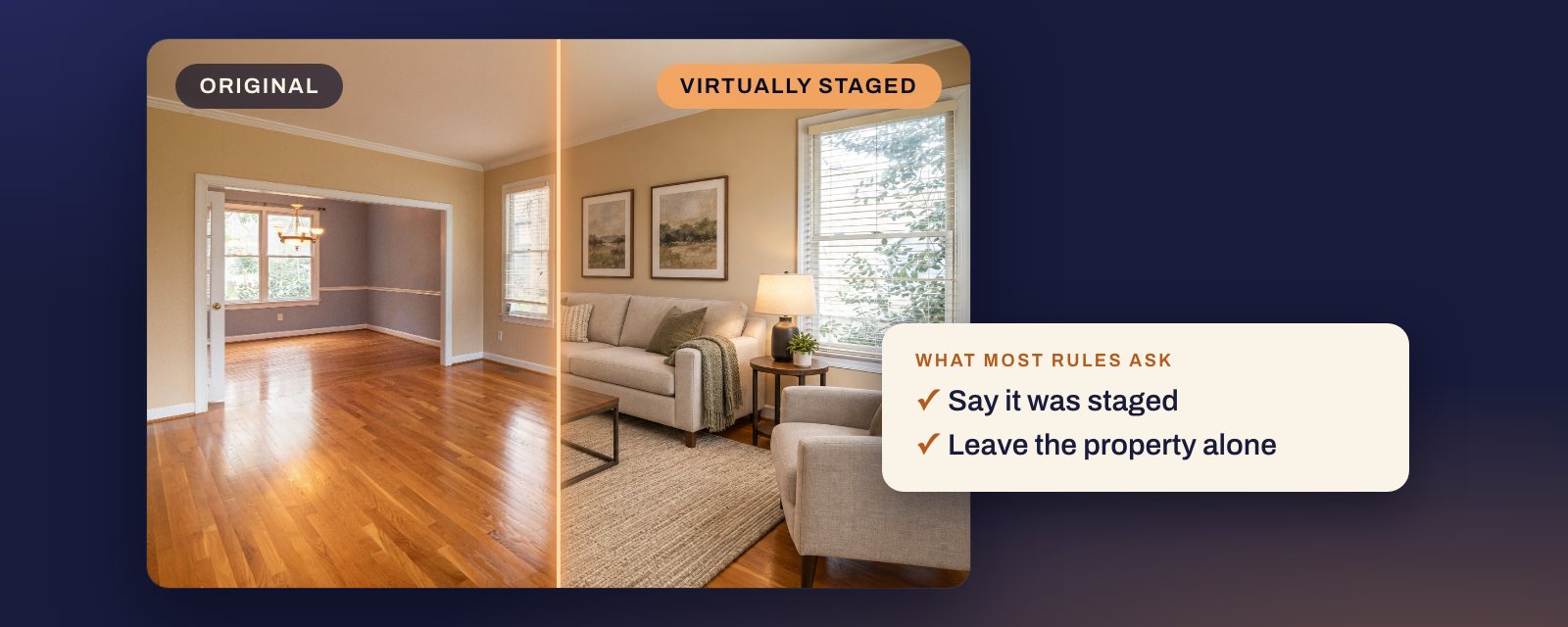
Short answer: yes, in the US, with disclosure. Every MLS rule on staging we could read allows it, and California’s law allows it as long as you disclose it. Most ask two things: say the photo was staged, and leave the property itself alone. Adding a sofa is fine. Hiding a crack or removing power lines is not, even with a label. A few MLSs let you show a change like new paint, but only as a marked alteration next to the original, and CRMLS allows it only when the home will really be changed to match by closing. California made disclosure a law in 2026, and several MLSs fine agents who skip it.
Everything below is quoted from its source. Where we could not read a rule, we say so.
Why staging is allowed and editing the house is not
A buyer who arrives to find no sofa has not been misled about the house. A buyer who arrives to find a different floor has. Most of the rules below draw the line in the same place: furniture and decor can be added, the parts of the property that are sold with it cannot be changed. Where an MLS allows a change to the property at all, as SmartMLS does for a new wall colour, it is as a marked alteration next to the original, not as staging.
For Realtors, that line comes from the Code of Ethics. Article 12:
REALTORS® shall be honest and truthful in their real estate communications and shall present a true picture in their advertising, marketing, and other representations.
Standard of Practice 12-10 says the “true picture” covers images, and prohibits “otherwise misleading consumers, including use of misleading images.” Source: NAR 2026 Code of Ethics and Standards of Practice.
The law: California’s AB 723
Since 1 January 2026, California requires a statement on or next to any digitally altered image in an advertisement for property, with a link, URL or QR code to the original. The statute’s definition of an altered image names furniture, so virtual staging is squarely in it. Source: Bus. & Prof. Code §10140.8.
The statute does not ban staging. It makes disclosure the condition for using it. Our AB 723 guide quotes the full text and covers what it means for each place you advertise.
Outside California, the rules that apply day to day are your MLS’s, and for Realtors, the Code of Ethics above.
What 11 MLSs say
The 10 that mention staging all allow it. They differ on whether the original must sit next to the edit, and on where the label goes. Labels have their own guide: watermark or caption, by MLS.
| MLS | Staging allowed | Original shown next to it |
|---|---|---|
| CRMLS (Southern California) | Yes, labelled | Yes, before or after |
| San Diego MLS | Yes, labelled | Yes, adjacent |
| Bay East (East Bay) | Yes, labelled | Yes, immediately after |
| Canopy MLS (Carolinas) | Yes, labelled on the image | Yes, before or after |
| Stellar MLS (Florida) | Yes, with remarks wording | Not stated |
| ARMLS (Arizona) | Yes, with Flexmls disclosure | Yes, before or after |
| SmartMLS (Connecticut) | Yes, watermarked | Not for staging |
| MLS Now (Ohio) | Yes, labelled on the image | Kept, given on request |
| MRED (Chicago) | Yes, disclosed | Not stated |
| REcolorado (Denver) | Yes | Not stated |
| NWMLS (Washington) | Not addressed | Not stated |
“Not stated” means the rule we read does not say. Fines have their own table below. NWMLS’s public guide does not mention virtual staging; it is here for what it bans, below.
What each one says, in its own words
CRMLS treats emptying a room as an alteration too: “Virtually clearing a room of furniture that will not be included at closing as part of the listed price is also considered digitally altered.” Source: CRMLS digitally altered image guidance, Rule 11.5.2.
San Diego MLS names AI outright: “Images created or modified using artificial intelligence, including AI virtual staging, are considered digitally altered and must be disclosed and accompanied by the original image.” Source: SDMLS AB 723 FAQ.
Bay East: “Yes. Virtual staging is allowed, but virtually staged photos must be clearly labeled, and unedited versions of the photos must also be included where required.” Source: Bay East digitally altered MLS photo rule, Q&A.
Canopy MLS: “A nonstaged (original) image MUST be included immediately before or after the AI enhanced or virtually-staged photo(s) or be easily accessible alongside the virtual tour.” Source: Canopy MLS support article.
Stellar MLS allows staging but not on homes that are not built yet: “Virtual Staging shall not be used for Pre-Construction & Under Construction properties.” Source: Stellar MLS Rules, Article 04.04, updated 27 September 2026.
ARMLS Rule 8.23 took effect on 28 May 2026. Its page says digitally altering media “is allowed, but requires, at a minimum, the MLS watermark ‘Digitally Altered’ disclosure on the photo paired with the original unaltered image.” Source: ARMLS digitally altered media.
SmartMLS separates the two cases. Virtually staged photos “Do not need to be accompanied by an original/‘as is’ photo.” Photos altered to add or remove parts of the property do. Sources: SmartMLS virtually staged photos and digitally altered photos, both updated 2 September 2026.
MLS Now Rule 3.3.1 permits “virtual staging limited to movable personal property (e.g., furniture, rugs, art)”, with disclosure, and Rule 3.3.5 says “Participants must retain original, unaltered media and provide it to MLS Now upon request for verification.” Source: MLS Now Rules, Section 3, effective 3 August 2026.
MRED, Rule 6.2.3: “Disclosure of virtually staged photo(s)/rendering(s) is required in the specified field.” Source: MRED Rules and Regulations.
REcolorado: “According to MLS policy, photos with virtual staging are acceptable. Virtual staging is not considered manipulating photos or the appearance of the property.” Source: REcolorado photo FAQs.
What staging cannot do, even with a label
This is where agents get caught. A label covers furniture. It does not cover a changed house.
CRMLS Rule 11.5.2 bars photos altered to add, remove or modify:
(i) real property elements including but not limited to flooring, walls, windows, structural elements, cabinetry, paint color, hardscape, landscape, façade, fixtures, or floor plans unless the listed property will be improved to match the altered photo at time of close as part of the listed price, or (ii) elements outside of, or visible from, the property, including, but not limited to, streetlights, utility poles, views through windows, and neighboring properties.
So new paint is allowed in a CRMLS photo only if the home will really be painted to match before closing, as part of the price. Power lines and the view have no exception. Its help page puts the first part more bluntly: “users CANNOT add, remove, or modify any real part of a property such as wall color, flooring, cabinets, wall dimensions, landscaping, etc.” Sources: CRMLS Rules and Policy Changes, effective 1 January 2026, CRMLS guidance.
Stellar MLS lists what staging may not do. Two of them catch agents who think only of the house itself:
D. Modifying photo(s)/rendering(s) to exclude negative visual elements is strictly prohibited. (example: holes in the wall, exposed wiring, damaged flooring, etc.)
F. Modifying photo(s) / rendering(s) to distort the dimensions of a room or space is strictly prohibited. (example: placing small furniture to make a room appear larger than it actually is.)
That last one matters for AI staging in particular. Furniture scaled down to make a small room look bigger breaks Stellar’s rule even though nothing in the room itself changed.
MRED, Rule 6.2.2.2:
Modifying photo(s)/rendering(s) to exclude visual elements not within a property owner’s control is strictly prohibited. Example: Removing power lines, water towers and/or nearby highways
NWMLS:
Do not manipulate images in a way that misrepresents what is for sale. Examples: removing the power lines, adding a lawn, adding a driveway, or removing any property defects.
REcolorado:
Permanent objects cannot be removed, the appearance of the landscape cannot be modified, and visual improvements cannot be made if they do not already exist.
Sources: CRMLS, Stellar MLS Article 04.04, MRED Rules and Regulations, NWMLS photography guide, REcolorado photo FAQs.
The fines, from the people who set them
| Who | What they publish |
|---|---|
| California (AB 723) | No fine in the section. The bill’s digest notes: “A willful violation of the Real Estate Law is a crime.” |
| CRMLS | “a warning at first and then, if not corrected in a timely manner, a $250 fine” |
| San Diego MLS | Its fine schedule (August 2024) lists up to $500 under Rule 11.5, the media rule its July 2026 rules tie to altered photos; a second offence of a rule within a year doubles it |
| Stellar MLS | Photos removed and a Level I automatic fine: $100, then $250, $500, and $1,000 with a hearing |
| ARMLS | $200 per violation once enforcement starts in December 2026; June to November 2026 is an education period with no fines |
| Canopy MLS | No amount published for this rule |
Sources: AB 723 bill page, CRMLS guidance, SDMLS schedule of fines, Stellar MLS Article 04.04 and Article 11.04, ARMLS digitally altered media, Canopy MLS support article.
The $250 often quoted as “the AB 723 fine” is CRMLS’s fine for its Rule 11.5.2. It is not a fine in AB 723, which names no amount.
Outside the US
Not everywhere treats a label as enough. In New South Wales, Fair Trading’s advertising guidance says agents must not “change the appearance of a property by digitally removing or adding features (adjusting the lighting effects only to compensate for poor lighting may be acceptable)”. Read plainly, adding features to a photo is not allowed there at all, labelled or not. It is guidance rather than legislation, and it does not say whether furniture counts as a feature. Source: NSW Fair Trading advertising guidelines.
Before you publish a staged photo
- Stage furniture and decor only. Leave walls, floors, fixtures, landscaping and the view alone.
- Keep furniture at real-world scale for the room.
- Label it the way your MLS asks: in the photo description, on the image, or both. See the label guide.
- Put the original next to it where your MLS requires that, and in California, link to it from every ad.
- Keep the original either way. MLS Now, for one, can ask for it.
How Duskly helps
Duskly stages furniture and decor and checks every render against your photo: the framing, the room’s edges, and that doors, windows and a kitchen island were left as they were. A render that fails is thrown out before you see it. Every paid render comes with the original, a public page that shows it, and disclosure wording for the MLS, your remarks and print. The disclosure generator is free and writes that wording for staging done anywhere. Try virtual staging.
Every quote on this page was re-read at its source on 23 October 2026, except the statute: California’s legislature site blocked our reader that week, so its text is as we read it on 24 September 2026, and the definition matches the copy in San Diego MLS’s July 2026 rules. Rules change; if one of these has, tell us and we will correct the page. This is a reading of published rules, not legal advice: for a specific listing, your MLS, your broker or a lawyer is the authority.