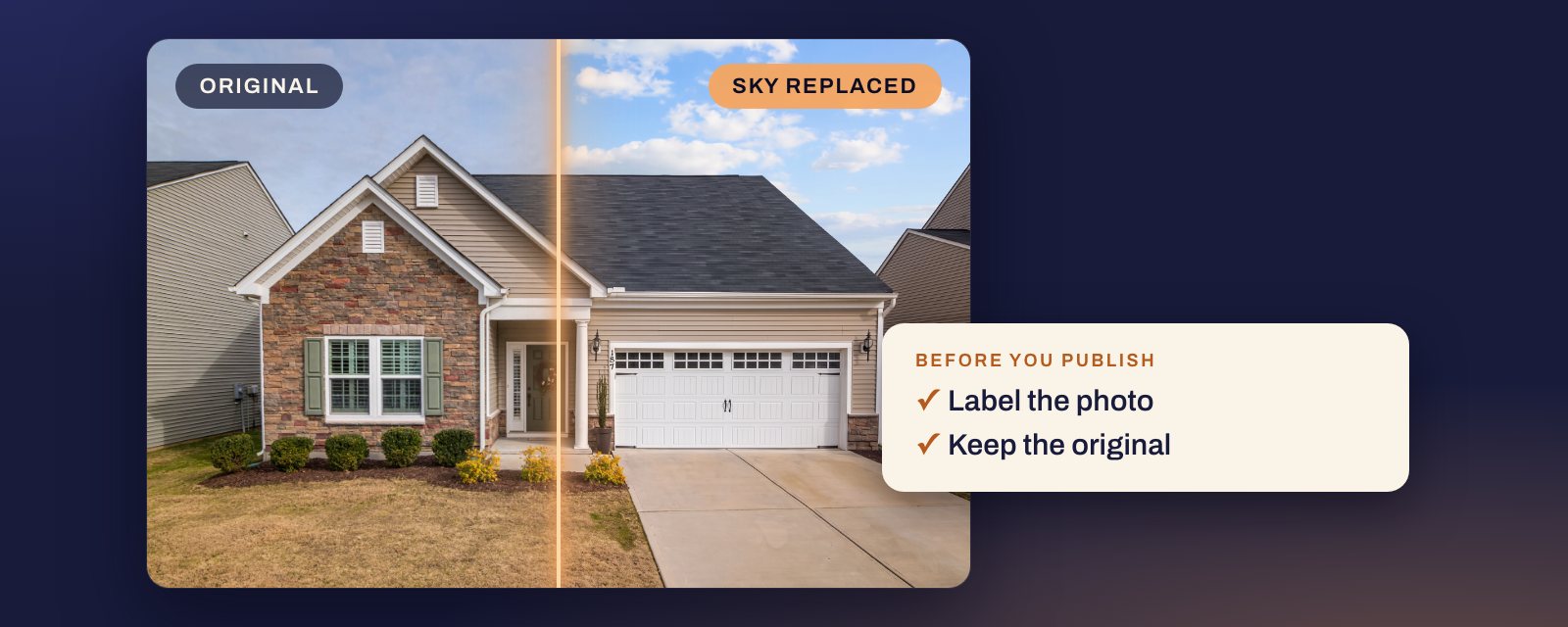
Short answer: none of the MLS rules we have read names sky replacement as banned (CRMLS’s wording is broad, see below), but treat it as a digitally altered photo: label it, and keep the original next to it. Bay East names “sky replacement” as a digitally altered image. California’s law does not name the sky, and its exemption covers colour correction only when it does “not change the representation of the real property”, so disclose. A new sky looks real when it agrees with the light on the house, fits the season, matches the listing’s other exteriors, and leaves everything below it alone: the wires, the trees, the roof edge, the house number. It must never change the view, hide a pole or a neighbour, or put a sunset where the sun does not set.
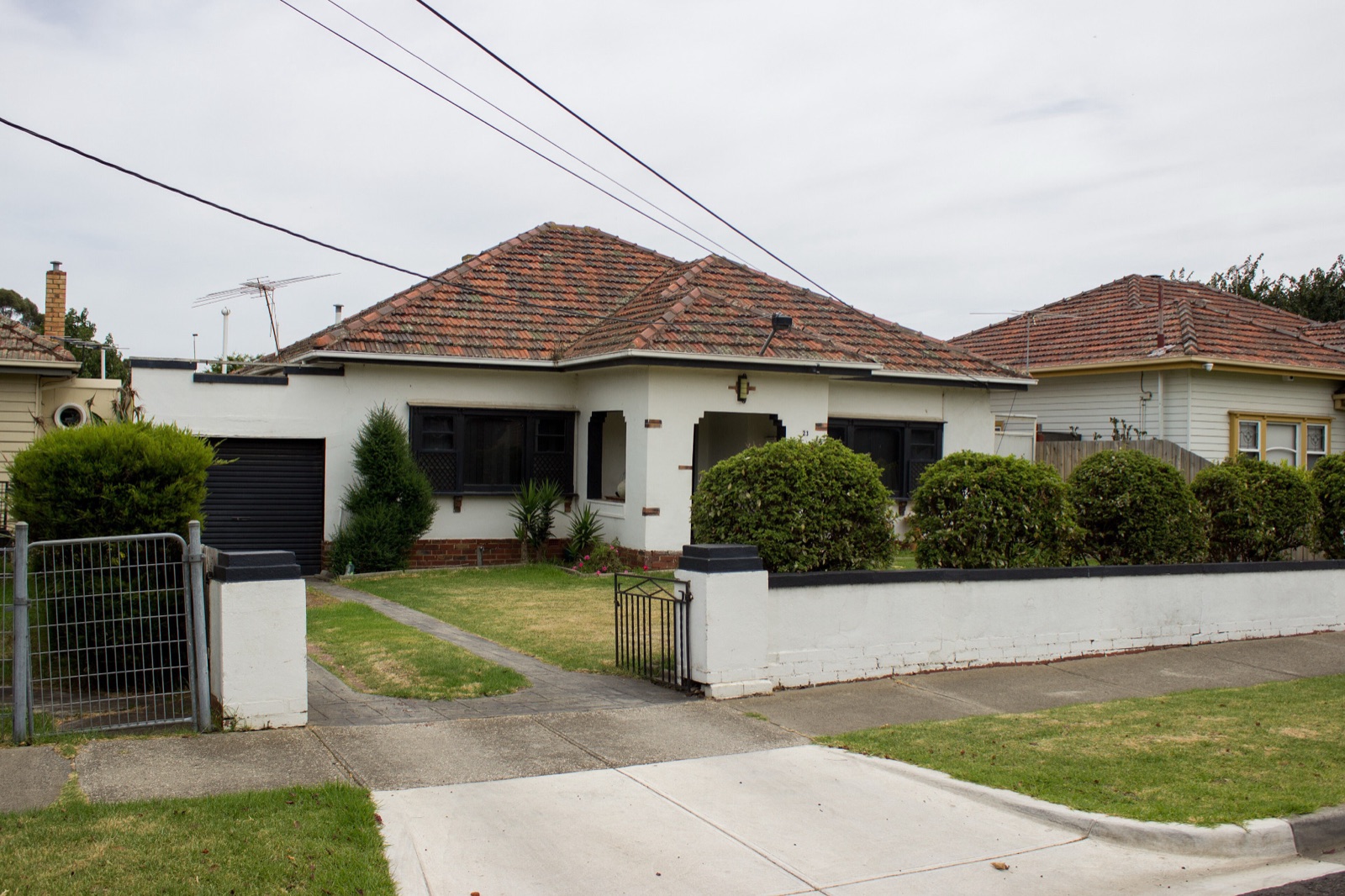
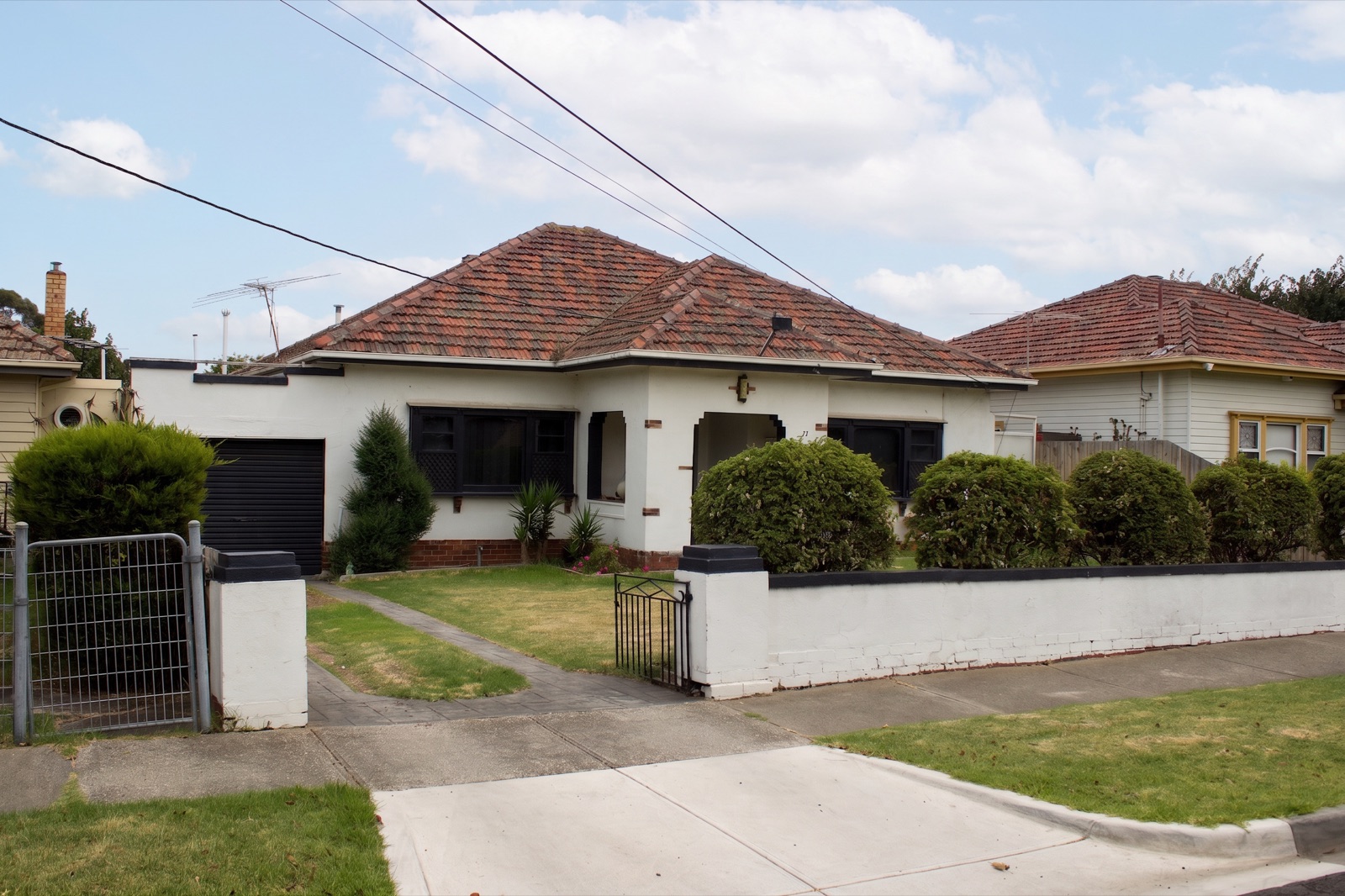
The most common edit on the portals
In a vendor study HousingWire reported on 24 June 2026, Coraly, which HousingWire calls a real estate intelligence platform, found that “Sky replacement alone appeared in 69% of altered images, making it the single most common editing technique.” And “More than 90% of altered images showed no visible disclosure language”. Source: HousingWire. We could not find Coraly’s report, so these are HousingWire’s figures.
So the most common edit is also, in that sample, mostly unlabelled. The rest of this guide is about doing it the other way.
Is sky replacement allowed?
None of the MLS rules we have read bans it by name, as long as you disclose it and only the sky changes. The detail differs, and CRMLS’s wording is the one to read closely.
California. The statute that AB 723 added, Bus. & Prof. Code §10140.8, counts as altered any change to “elements outside of, or visible from, the property, including, but not limited to, streetlights, utility poles, views through windows, and neighboring properties.” The sky is not on the list, but the list is examples, not a limit. The exemption covers “only lighting, sharpening, white balance, color correction, angle, straightening, cropping, exposure, or other common photo editing adjustments … that do not change the representation of the real property.” Our reading: a sky with clouds that were not there is a replacement, not a colour correction, so disclose it. HousingWire, writing about Coraly’s report, says the law’s wording “may include sky visible above a property’s roofline”, and the report asks regulators to issue guidance on sky replacement. Until they do, disclose. Source: San Diego MLS prints §10140.8(b) word for word in Rule 7.4.2 of its July 2026 rules; HousingWire. What a California disclosure must contain is in our AB 723 guide.
Bay East answers it directly. Its Q&A says a digitally altered image “includes, but is not limited to, virtual staging, object removal, sky replacement, AI enhancements, or digital renderings.” It is allowed, labelled, with the original displayed right after it. Source: Bay East digitally altered MLS photo rule, Questions and Answers.
ARMLS draws the line at colour. Its FAQ: “Do I have to add a Digitally Altered watermark if I changed the color of the sky? No. Please submit a photo for review if you are unsure.” Its page also lists “Sky and Color Grading” among examples not considered digitally altered. But it says elsewhere that “an image is Digitally Altered when adding, removing or changing content.” Our reading: grading the sky you have is fine there; a different sky, with clouds that were not in the photo, adds content, so label it or submit it for review. Source: ARMLS digitally altered media.
CRMLS Rule 11.5.2 bars, with no exception, an image altered to change “(ii) elements outside of, or visible from, the property, including, but not limited to, streetlights, utility poles, views through windows, and neighboring properties.” Read literally, the sky is visible from the property. Every example the rule gives is a fixed thing a buyer would find when they visit, and a sky is not. Our reading: a new sky over the same scene, labelled, is not what (ii) is aimed at, but a sky edit that changes anything else outside the house is squarely inside it. If you list on CRMLS and are unsure, ask CRMLS before you publish. Source: CRMLS Rules and Policy Changes, effective 1 January 2026, Rule 11.5.2.
Stellar MLS does not name sky replacement. Its Article 04.04 says: “All photos must represent a true and accurate picture of all property features and surroundings.” Source: Stellar MLS Rules, Article 04.04, last updated 27 September 2026.
For 25 other common edits sorted the same way, see what counts as a digitally altered photo. For a dusk sky, which adds a change of time, see is day to dusk allowed on the MLS?
How to disclose it
The same way as any other altered photo: a label on or next to the photo, the original right beside it where your MLS asks, and in California a link to the original. Duskly’s wording for a sky is “This image has been digitally altered to replace the sky.” in the photo description, and “Digitally Altered” on the image. Which words go where at each MLS is in our watermark or caption guide. For a sky replaced anywhere else, the free disclosure generator writes the wording.
How to make a new sky believable
Open the original and the edit at the same size and flick between them. Then zoom to full size for checks 4 to 6. The examples below are real renders from our lab, all made with the same sky instruction Duskly uses today.
1. The sky agrees with the light on the house
Look at the shadows first. Hard, sharp shadows mean the sun was out: the new sky needs open blue on the side the light comes from, not a heavy cloud bank. Soft shadows, or none, mean the photo was shot under cloud: a sky with soft cloud in it reads truer than a clear, deep blue one. Change the sky to fit the light, never the light to fit the sky. Brightening or warming the house to match a sunny sky changes how its paint, roof and lawn look.
Duskly’s instruction says the same: keep the light on the building “exactly as it is”, and “Do not brighten or warm the house to match the new sky.” It rejects a render that moves the photo’s average colour by more than 20%. Its default sky is soft cloud.
2. The sky fits the place and the season
Muted beats dramatic. A deep summer sky over bare trees, snow or a dormant lawn says something about the day that was not true. So does a tropical blue over a grey street in winter. Pick the plainest sky that fixes the problem. Duskly offers three daytime skies: clear blue, soft cloud and dramatic. For most photos, start with soft cloud.
3. Every exterior in the listing gets the same sky
Buyers see the front, the back and the street view one after another. If the front has towering cumulus and the back has a clear blue sky, the set looks edited even when each photo looks fine on its own. Use one sky setting for all of a listing’s exteriors, then look at them in a row. Duskly draws a new sky for each photo from the setting you choose; it does not copy one photo’s sky into the next, so do this check yourself.
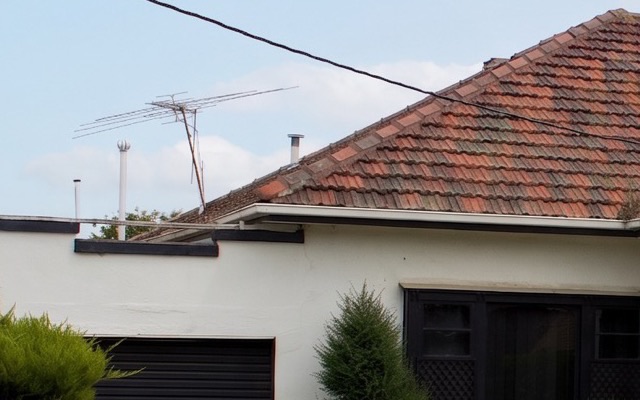
4. Clean edges at the roof, wires, aerials and trees
This is where a cut-out sky gives itself away. Zoom to full size along the roofline, chimneys, aerials, power lines and branches. A pale or dark outline around them is the old sky showing through.
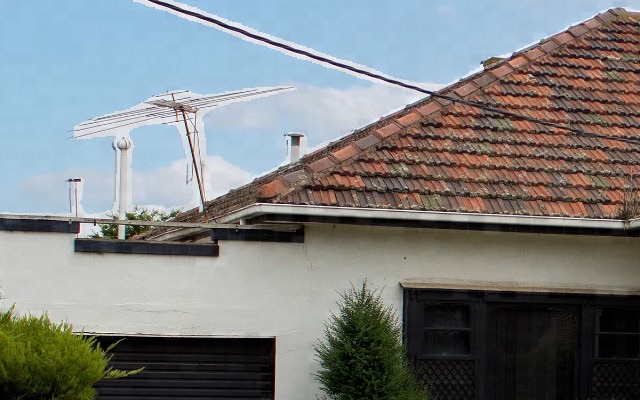
5. Nothing new in the sky
A sky edit should add sky and nothing else. Check the corners and the top edge for branches, birds, planes, moons or roofs that were not there.


Our reading: a branch that was never there is a change to the landscape, which §10140.8 names, not part of the sky.
6. Below the sky, nothing changed
An AI sky edit redraws the whole photo, not only the sky. Small things below it can change on the way: text, numbers, window bars, gutters, the grass. Flick between the two and read every number and sign.
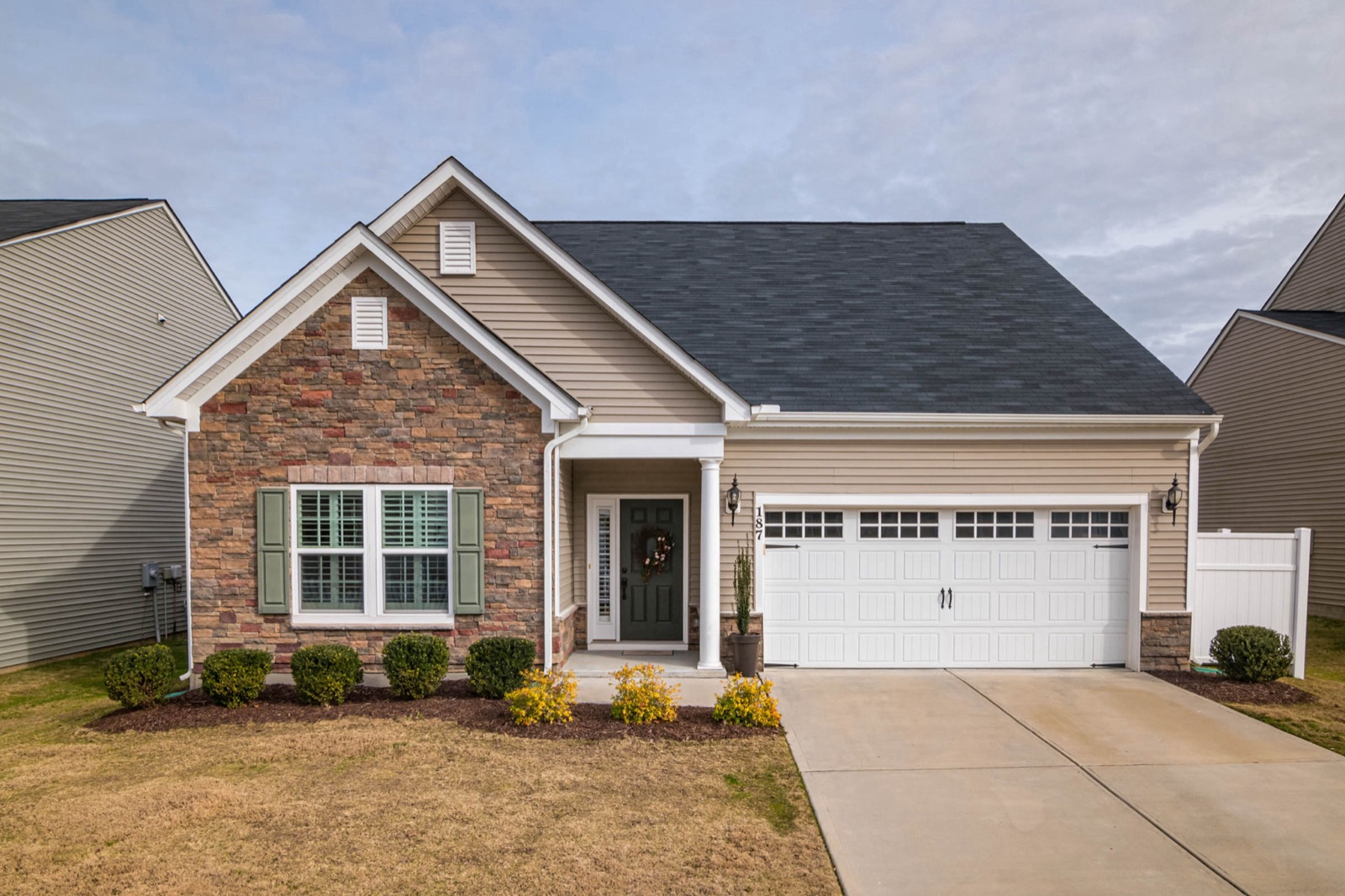
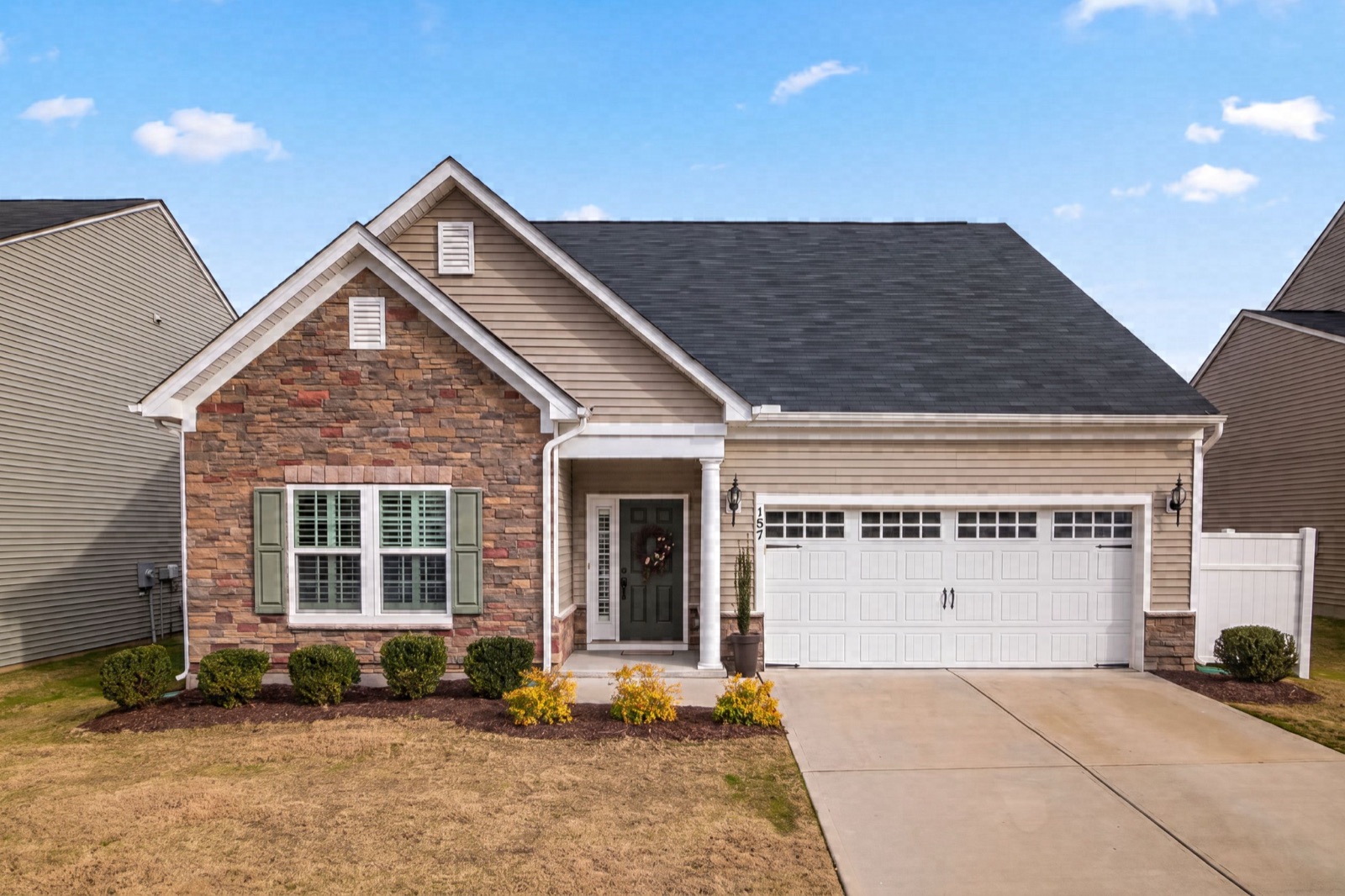
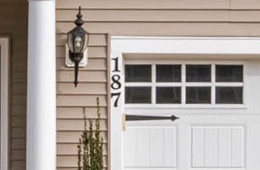
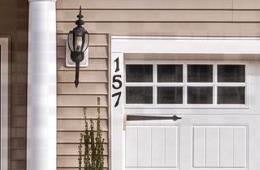
A wrong house number puts a different address on the listing. If you find a change like this, run the edit again. Do not paint the old number back in: that makes a third image that is neither the photo nor the render.
7. Windows and water show the right sky
Glass, pools and car roofs reflect the sky. Duskly’s instruction is to change only the area that is currently sky, so reflections are meant to stay as shot. Grey glass under a grey sky was right; under a deep blue sky it can look off. Our reading: if a window or pool still shows a white sky under a bright blue one, choose a softer sky rather than painting a new reflection into the glass.
What not to do
- Don’t put in a new view. A sky edit that also swaps the hillside, the skyline or the trees behind the house is a view change. §10140.8 names “views through windows”, CRMLS Rule 11.5.2 bars changing them with no exception, and Stellar’s Article 04.04 bars “editing in a view of the gulf/ocean, lighting and/or popular landmarks that are not physically possible from the specified location in the real world.” Source: Stellar MLS Article 04.04.
- Don’t clean up the sky while you are in it. Power lines, poles, aerials and the neighbour’s roof stay. CRMLS bars removing “streetlights, utility poles” and “neighboring properties”, and Northwest MLS gives “removing the power lines” as its first example of misrepresenting what is for sale. The Coraly study HousingWire reported found 66 images where “items such as satellite dishes or utility meters had been digitally removed.” Sources: CRMLS Rule 11.5.2, NWMLS, HousingWire.
- Don’t put a sunset where the sun cannot set. Stellar allows twilight photos only “as long as lighting is not added where it does not exist and sunset/sunrise is a true reflection of where the sun rises and sets”. So work out which way the camera faced: a sunset glow belongs in a photo looking roughly west, never in one looking east. Duskly’s sky tool offers daytime skies only; for dusk, see is day to dusk allowed on the MLS? Source: Stellar MLS Article 04.04.
How Duskly helps
Duskly’s sky replacement tells the model to keep the building, roofline, windows, wall colour, driveway, fencing and landscaping exactly as they are before it says anything about the sky. Then it asks for one of three daytime skies, with the light on the house unchanged and “every roofline, aerial, cable, tree and branch silhouetted against the sky exactly where it is.” Every render is checked against your photo before you see it, and thrown out if:
- Framing: the shape of the photo changed by more than 1%, or the view zoomed in or out by more than 2%.
- Structure: the lines of the photo match the original at less than 0.60, across the whole frame.
- Colour: the photo’s average colour moved by more than 20%, which would mean the house was relit, not just the sky.
- Exposure: a large share of the frame was blown to white, crushed to black or pushed to extreme saturation.
If a render fails, Duskly runs another, up to three attempts. What those checks do not do: Duskly does not cut the sky out with a mask, so the model redraws the whole photo, and the checks do not read numbers or signs, look for new objects in the sky, or compare skies across a listing. The branch and the house number above both passed. So look at every render next to its original before it goes on the MLS, whatever made it. Every paid render comes with the original and the disclosure wording above.
How we made this: the renders are from our September 2026 lab runs with the same sky instruction and model Duskly uses today, apart from the right-hand edge crop under check 4, which comes from a masking experiment we did not ship. They are shown as the model returned them, apart from resizing and cropping. The three from 15 September also carry the invisible watermark Duskly’s pipeline added to every render at the time, which does not change what you see. Duskly’s current checks were re-run on each pair on 24 October 2026. Every source on this page was re-read on 24 October 2026, except the statute’s own page: leginfo.legislature.ca.gov refused our request that day, so the statute text is quoted from San Diego MLS’s Rule 7.4.2, which prints it word for word. Photos: House on suburban street in Sunshine, Victoria by Philip Mallis, CC BY-SA 2.0; the edited versions are also shared under CC BY-SA 2.0. House with a double garage by Curtis Adams via Pexels. Rules change; if one of these has, tell us and we will correct the page. This is a reading of published rules, not legal advice: for a specific listing, your MLS, your broker or a lawyer is the authority.