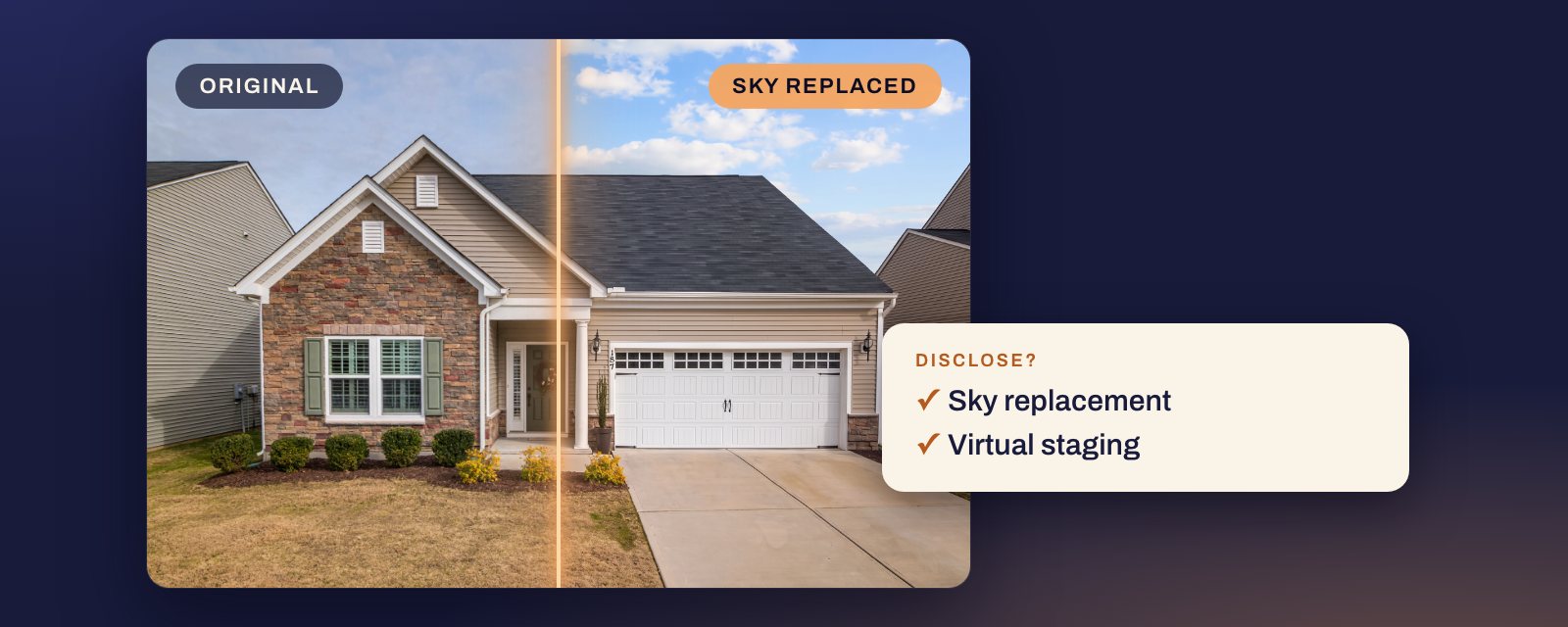
Short answer: a photo is digitally altered when something in it was added, removed or changed. Correcting how the camera saw the scene is not: exposure, white balance, straightening and cropping are exempt under California’s law and at most of the MLSs we read that publish an exempt list, as long as the property looks the way it really does. Everything else needs a disclosure, and some edits are not allowed at all, even with one. Of the 25 common edits below, 5 need no disclosure, 1 is a grey area, 12 need one, and 7 are banned by at least one MLS we read.
This guide sorts edits. For what a disclosure has to contain, see our AB 723 guide. For staging rules and fines, see is virtual staging legal?.
Is it illegal to photoshop real estate photos, or to edit them with AI?
No, editing is not illegal in itself. Bay East puts California’s law this way: “The law does not prohibit photo editing; rather, it requires disclosure when images have been altered and the inclusion of unedited photos to clearly distinguish original from modified images.” An ad that uses an altered photo needs a statement on or next to it and a link, URL or QR code to the original. What is not allowed is a photo that misrepresents the property, and some MLSs ban certain edits even with a label.
The law does not care which tool you used. California’s definition, quoted in full below, covers an image “altered through the use of photo editing software or artificial intelligence to add, remove, or change elements in the image”. Photoshop and AI are treated the same, and what decides it is what changed. Fixing exposure, white balance or a crooked frame needs nothing under the statute, though MLS Now still asks for a label (see below). Adding furniture, removing a car or replacing the sky needs the statement and the link. Where the statement goes, and what happens if you skip it, is in our AB 723 guide. Source: Bus. & Prof. Code §10140.8, (b)(1), as printed in Bay East’s Rule 11.5.1 on its rule page.
The bans come from the MLSs. CRMLS Rule 11.5.2 says subscribers “may not add to a listing record any image or photo that has been altered to add, remove, or modify any” of the property’s “real property elements”, from flooring and paint to landscape and façade, “unless the listed property will be improved to match the altered photo at time of close as part of the listed price”, or any “elements outside of, or visible from, the property, including, but not limited to, streetlights, utility poles, views through windows, and neighboring properties.” That second list has no exception, and a label does not make those edits allowed. Source: CRMLS Rules and Policy Changes, effective 1 January 2026, Rule 11.5.2. The tables below show which edits sit on which side of the line. This answer reads California’s law and the MLS rules quoted on this page; if you list elsewhere, check your own state’s law and your MLS’s rules.
Can you use AI photos on the MLS?
Yes, under every MLS rule quoted in this answer, as long as you disclose the edit and show the original next to it. None of them bans AI as such. They treat an AI edit like any other altered photo. Some, CRMLS among them, also ban changing the property itself, whatever tool does it.
San Diego MLS answers the question directly in its AB 723 FAQ, answer 8: “Does this apply to AI-generated or AI-enhanced images? Yes. Images created or modified using artificial intelligence, including AI virtual staging, are considered digitally altered and must be disclosed and accompanied by the original image.” Source: SDMLS AB 723 FAQ.
CRMLS Rule 11.5.2 names AI in its own definition, an image altered “through the use of photo editing software or artificial intelligence”, and accepts “AI Altered” as a label, next to “Photo Modified”, “Virtually Staged” and “Digitally Altered”. Bay East asks for “altered,” “digitally altered,” or “AI altered.” ARMLS: “A photo is considered Digitally Altered when software or AI is used to add, remove, or significantly change image content.” Canopy MLS says “AI-enhanced images, virtually staged images, and virtual tours must be used ethically and with full transparency – never to deceive.” Sources: CRMLS Rules and Policy Changes, Bay East, ARMLS, Canopy MLS support article.
What AI may not do is invent the home: CRMLS does not allow AI landscaping unless the seller will make the changes (see Lawns and landscaping below). Where the label has to go differs by MLS: on the photo at some, never on the photo at others. Our label guide has each one. For staged photos in particular, see is virtual staging legal?
The two lists in the law
California’s §10140.8, added by AB 723, defines the term, and San Diego MLS and Bay East copy the definition into their own rules. It has two lists: what counts, and what does not.
What counts:
(b) (1) For purposes of this section, “digitally altered image” means an image, created by or at the direction of the real estate broker or salesperson, or person acting on their behalf, that has been altered through the use of photo editing software or artificial intelligence to add, remove, or change elements in the image, including, but not limited to, fixtures, furniture, appliances, flooring, walls, paint color, hardscape, landscape, facade, floor plans, and elements outside of, or visible from, the property, including, but not limited to, streetlights, utility poles, views through windows, and neighboring properties.
What does not:
(2) “Digitally altered image” does not include an image where only lighting, sharpening, white balance, color correction, angle, straightening, cropping, exposure, or other common photo editing adjustments are made that do not change the representation of the real property.
Two phrases do most of the work. “Including, but not limited to” means the first list is examples, not a complete list: removing a car counts even though cars are not named. And the exemption only covers adjustments that “do not change the representation of the real property”. Turning a brown lawn green is colour correction in a technical sense, but it changes what the photo says about the yard.
Source: Bus. & Prof. Code §10140.8. San Diego MLS prints the same subdivision word for word in Rule 7.4.2 of its July 2026 rules, and Bay East uses it as its Rule 11.5.1 on its rule page.
The 25 edits
How to read the tables. No: in the statute’s exemption, and most MLSs that publish an exempt list agree; MLS Now does not (see below). Yes: disclose it, with the original alongside where your MLS asks. Banned at some MLSs: at least one MLS we read does not allow it, even labelled; where yours allows it, disclose it. Where the statute does not name an edit, the reason says “our reading”.
Light and colour
| Edit | Disclose? | Why |
|---|---|---|
| HDR blending | No | “exposure” and “lighting” are in the exemption |
| White balance | No | Named in the exemption |
| Window pull | No, from your own frames | Recovers the real view. A pasted or generated view changes “views through windows” |
| Straightening and lens correction | No | “angle” and “straightening” are in the exemption |
| Cropping | No | Named in the exemption |
The window pull is our reading. Blending a darker exposure of the same window shows a view that was really there. Putting in a view from another photo, or letting AI invent one, changes an element the statute names. Stellar MLS gives an example of what is banned: “editing in a view of the gulf/ocean, lighting and/or popular landmarks that are not physically possible from the specified location in the real world.” Source: Stellar MLS Rules, Article 04.04.
Watch one-click AI “enhance” buttons. Bay East’s Q&A lists “AI enhancements” among digitally altered images, and Canopy MLS requires a label on any “AI-enhanced” image. If the tool redraws detail rather than adjusting tone, treat the result as altered. Sources: Bay East Q&A, Canopy MLS support article.
Cleanup and small additions inside
| Edit | Disclose? | Why |
|---|---|---|
| Removing cords | Yes | Removes an element. Our reading |
| Removing personal photos | Yes | Removes an element. Our reading |
| Decluttering | Yes | ARMLS’s FAQ says yes |
| Fire in the fireplace | Yes | ARMLS’s FAQ names it |
| TV screen fill | Yes | Adds an image that was not there. Our reading |
ARMLS answers two of these directly. On decluttering: “Yes, an image is Digitally Altered when adding, removing or changing content.” On a fire: “Yes. For fireplaces, an image is Digitally Altered when adding, removing or changing content.” Source: ARMLS digitally altered media, FAQs.
Cords and frames are small, but the statute does not set a size. The cheaper fix is on the day. NWMLS’s photo guide suggests asking sellers to “stash wires and cords, and remove personal belongings” before the shoot. Source: NWMLS real estate photography 101.
Outside and sky
| Edit | Disclose? | Why |
|---|---|---|
| Sky replacement | Yes | Bay East names it |
| Day to dusk | Yes, by default | Not in the statute. Stellar allows twilight under a rule that needs disclosure |
| Twilight lights in windows | Yes | Adds light. Stellar: not “where it does not exist” |
| Removing a car | Yes | Removes an element. Our reading |
| Removing trash cans | Yes | Removes an element. Our reading |
| Blurring a house number | Grey | Not named. ARMLS asks you to blur a yard sign, with no watermark |
| Lawn greening | Banned at some MLSs | Changes “landscape”. REcolorado bars changing it |
| Adding landscaping | Banned at some MLSs | NWMLS and REcolorado bar it. CRMLS too, unless the seller will do the work |
| Removing power lines | Banned at some MLSs | The statute names “utility poles”. Five MLSs we read bar it |
| Removing a neighbour’s house | Banned at some MLSs | The statute names “neighboring properties”. MLS Now bars it |
Sky. Bay East’s Q&A defines a digitally altered image as one “modified after capture in a way that changes or enhances the appearance of the property”, and lists “virtual staging, object removal, sky replacement, AI enhancements, or digital renderings.” ARMLS goes the other way on colour only: “Do I have to add a Digitally Altered watermark if I changed the color of the sky? No. Please submit a photo for review if you are unsure.” A tint is not a new sky. Sources: Bay East, ARMLS.
Dusk. No statute names it. Stellar MLS’s Article 04.04 is the one rule we found that does: “Twilight photos are acceptable as long as lighting is not added where it does not exist and sunset/sunrise is a true reflection of where the sun rises and sets”. It sits in Stellar’s virtual staging rule, which requires disclosure. Our own ruleset classifies day to dusk as ambiguous, and ambiguous resolves to disclose. Our reading of “where it does not exist” is that window glow belongs only in rooms that have a real light. The full reasoning is in is day to dusk allowed on the MLS?. Source: Stellar MLS Article 04.04.
Cars and bins. None of the MLS rules we read bars removing them by name. MRED and Canopy MLS bar removing “visual elements not within a property owner’s control”, which in our reading takes in a neighbour’s car or a bin on the street, so check before you remove those there. Elsewhere they are still removed elements, so disclose. Or skip the edit: NWMLS says “Don’t take exterior shots on garbage day!” Sources: NWMLS, MRED Rules and Regulations, Rule 6.2.2.2, Canopy MLS.
House numbers. Nothing we read names them. ARMLS’s FAQ, asked whether removing a yard sign needs the watermark, answers: “No, please blur and follow the blurring guideline in this blog.” That suggests ARMLS treats blurring as outside its rule, but it is about a sign, not a number. Elsewhere, if you are unsure, disclose. Source: ARMLS.
Lawns and landscaping. CRMLS: “Are AI-generated landscaping images permitted in the MLS? No.” It allows a landscaping edit only where the seller will make those changes as part of the listed price. REcolorado: “the appearance of the landscape cannot be modified”. NWMLS gives “adding a lawn” as an example of misrepresenting what is for sale. Sources: CRMLS digitally altered image guidance, REcolorado photo FAQs, NWMLS.
Power lines and neighbours. CRMLS says subscribers may not remove “unsightly elements like utility poles or wires.” MRED Rule 6.2.2.2, Canopy MLS and NWMLS all give removing power lines as their example of what is prohibited, and MLS Now Rule 3.3.2 lists “neighboring structures, roads, powerlines” among prohibited alterations. ARMLS is the exception we found: its page shows “Digitally Altered Power Lines Removed” among its examples of digitally altered photos, next to the original. Sources: CRMLS, MRED Rules and Regulations, Canopy MLS, NWMLS, MLS Now Rules, Section 3, ARMLS.
Staging and renovation
| Edit | Disclose? | Why |
|---|---|---|
| Emptying a room | Yes | CRMLS names it |
| Virtual staging | Yes | The statute names “furniture” |
| Repainting walls | Banned at some MLSs | The statute names “paint color”. CRMLS bars it unless the home will match at close; Canopy allows it labelled |
| New flooring | Banned at some MLSs | The statute names “flooring”. CRMLS bars it unless the home will match at close; MLS Now unless it is new construction or a marked proposed improvement |
| Virtual renovation | Banned at some MLSs | Allowed at some MLSs only for planned or new-build work |
CRMLS on emptying a room: “Virtually clearing a room of furniture that will not be included at closing as part of the listed price is also considered digitally altered.” On paint and floors, Rule 11.5.2 bars altered “real property elements including but not limited to flooring, walls, windows, structural elements, cabinetry, paint color, hardscape, landscape, façade, fixtures, or floor plans unless the listed property will be improved to match the altered photo at time of close as part of the listed price”. Its help page is blunter: “users CANNOT add, remove, or modify any real part of a property such as wall color, flooring, cabinets, wall dimensions, landscaping, etc.” Sources: CRMLS Rules and Policy Changes, effective 1 January 2026, CRMLS digitally altered image guidance. Canopy MLS goes the other way on paint, allowing “Cosmetic alterations only (e.g., paint color or décor changes) provided no structural changes are shown or implied”, with a label on the image. Source: Canopy MLS support article.
MLS Now Rule 3.3.3 allows a “Virtual Remodel” only labelled on the image, and it “must not depict features or conditions that do not exist, except for new construction or proposed improvements expressly identified as such.” MRED Rule 6.2.3.1 allows staging of “all facets of real property” only for to-be-built or under-construction listings. Sources: MLS Now Rules, Section 3, MRED Rules and Regulations.
What staging may and may not include, MLS by MLS, is in is virtual staging legal?.
Where the MLSs differ on “no disclosure”
The exempt list is not the same everywhere. Before you rely on it, check which version your MLS uses.
- CRMLS, FAQ: “Minor photographic adjustments, such as brightness, color correction, sharpening, or lighting are not affected by this rule.” Source: CRMLS.
- San Diego MLS: its rules adopt the statute, but its FAQ’s list of edits that “do not require disclosure” is “Brightness, exposure, or contrast adjustments”, “Color correction”, “Cropping or resizing”, “Straightening or sharpening” and “Other standard image quality enhancements”. Its examples of altered images include “Modifying views or backgrounds”. Source: SDMLS AB 723 FAQ, answers 4 and 5.
- ARMLS: “Photos with standard adjustments such as brightness, contrast, color, cropping or sharpening are not considered Digitally Altered”, with “Sky and Color Grading” among its examples. Source: ARMLS.
- MLS Now is stricter. Rule 3.3.1 lists “minor cosmetic edits (exposure, white balance, lens distortion)” under “Permitted alterations (with disclosure)”, so at MLS Now exposure, white balance and lens fixes need a label, and in our reading so does the rest of the first table. Source: MLS Now Rules, Section 3, effective 3 August 2026.
- New South Wales, outside the US: Fair Trading’s guidance says agents must not “change the appearance of a property by digitally removing or adding features (adjusting the lighting effects only to compensate for poor lighting may be acceptable)”. That is narrower than California: lighting fixes may be fine, and adding or removing features is not allowed at all, labelled or not. It is guidance, not legislation. Source: NSW Fair Trading advertising guidelines.
We have not read the rules of most other MLSs. Some are behind a member login. If yours is not here, its rulebook is the answer.
When in doubt
CRMLS puts it plainly:
When in doubt, err on the side of caution. If you can’t determine if an image is digitally altered, it is advised to disclose that it is via the process established above.
A test that sorts almost every edit: would a buyer standing where the camera stood see something different from the photo? If not, it is a correction. If so, disclose it. And if the difference is in something sold with the house or around it (walls, floors, the yard, the view, the street), check your MLS before you publish, because a label may not be enough. ARMLS also lets you submit a photo for its review. Source: CRMLS, ARMLS.
How Duskly helps
Duskly classifies each of its own edits and shows the class next to the disclosure wording. Staging, decluttering, emptying a room and sky replacement are marked to disclose. Day to dusk is marked ambiguous and is disclosed by default. Renovation is flagged as prohibited in some markets, because several rulebooks do not allow it even with a label. Every paid render comes with the original and disclosure wording for the MLS photo description, public remarks and print. For a photo edited anywhere else, the free disclosure generator lets you pick from the same six edits and writes the same wording.
Every quote on this page was re-read at its source on 24 October 2026, except the statute’s own page: leginfo.legislature.ca.gov refused our request that day. The statute text above was last read there on 24 September 2026, and it matches the copy San Diego MLS prints in Rule 7.4.2, which we re-read on 24 October 2026. Rules change; if one of these has, tell us and we will correct the page. This is a reading of published rules, not legal advice: for a specific listing, your MLS, your broker or a lawyer is the authority.